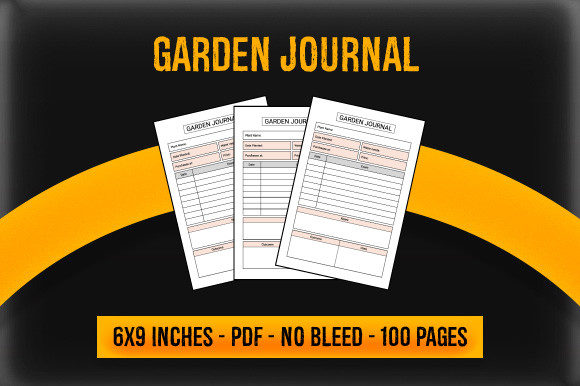
KDP Interior - Garden Journal: Selecting the Right Ready-to-Use PDF for Your Publishing Business
The low-content book market on Amazon has matured significantly, moving past generic lined notebooks toward niche-specific utilities. Among these, the gardening niche remains a perennial bestseller because it serves a passionate, recurring audience. For publishers and creators, sourcing a high-quality KDP Interior - Garden Journal is often the fastest route to market. However, speed should never compromise technical accuracy or user experience. A ready-to-use PDF file containing 100 pages of structured interiors offers immense potential, but only if you understand the specific requirements of print-on-demand production.
Many new publishers assume that any digital download labeled "garden journal" will automatically result in sales or positive reviews. This assumption leads to costly reprints, rejected manuscripts, and poor customer feedback. The difference between a successful product and a failed one often lies in understanding bleed settings, resolution standards, and interior usability. Before you add a cover and hit publish, it is vital to evaluate your source files with a critical eye.
Understanding Bleed vs. No Bleed in Garden Journals
The most frequent technical error when using pre-made KDP interiors involves misunderstanding bleed settings. Your digital file includes options for both bleed and no bleed versions at 6″ x 9″ inches. Choosing the wrong version for your intended design is not merely a preference; it is a manufacturing constraint.
No Bleed means all content must stay within a safe margin, typically 0.375 inches from the edge on the binding side and 0.25 inches on the outer edges. If your garden journal features simple text prompts, tables for planting schedules, or grid paper that does not touch the page edge, the no bleed PDF is usually safer and easier to format. It reduces the risk of crucial information being trimmed off during the binding process.
Bleed is required only if your interior elements extend completely off the edge of the page. Many aesthetically pleasing garden journals feature floral borders, full-page botanical illustrations, or background textures that run to the trim line. If you select the bleed version, ensure your PDF canvas size is actually 6.125″ x 9.25″. A common mistake is uploading a standard 6″ x 9″ file while selecting "bleed" in the KDP dashboard. This results in Amazon stretching your content to fit the larger canvas, causing pixelation and distorted layouts. Always verify the physical dimensions of the PDF before uploading.
Evaluating Resolution and Print Quality
Gardening enthusiasts are visual people. They expect crisp lines for sketching plant layouts and clear text for recording soil pH levels. A significant oversight occurs when publishers prioritize file size over resolution. While a low-resolution PDF might load faster on your computer, it will fail quality checks on the printing press.
Ensure your ready-to-use PDF files are truly high-resolution. For black and white interiors, which constitute most garden journals, the standard is 300 DPI (dots per inch) at actual print size. Some vendors supply files that appear sharp on screen at 72 DPI but look jagged or gray when printed. Before committing to a full upload, print a single test page on your home printer at 100% scale. If the lines look fuzzy or the text is hard to read at arm's length, the file is unsuitable for professional publishing.
Additionally, check the contrast. Home screens display images with backlighting, making light gray lines visible. Printed paper relies on reflected light. Faint guidelines for drawing garden beds or writing notes may disappear entirely in print. A practical correction is to darken any line work lighter than 20% gray before finalizing your manuscript. High-contrast interiors improve usability and reduce customer complaints about "invisible" pages.
Assessing Interior Usability Over Aesthetics
A beautiful interior does not always equal a functional journal. When evaluating a 100-page KDP interior, put yourself in the shoes of the gardener. Does the layout actually support the activity? A common pitfall is choosing interiors based solely on decorative appeal rather than practical utility.
Consider the writing space. Gardeners often write outdoors or in potting sheds where surfaces may be uneven. If the provided lines are too narrow or the margins too tight, the journal becomes frustrating to use. Verify that there is adequate gutter margin (the inner binding space). On a 6″ x 9″ book, a gutter of at least 0.375″ to 0.5″ is necessary to prevent text from disappearing into the spine. If your pre-made PDF has content crowding the center fold, users will have to break the spine to write comfortably, leading to negative reviews regarding durability and design.
Also, evaluate the logical flow of the 100 pages. Does the journal include essential sections like frost date trackers, seed inventory logs, harvest records, and monthly observation pages? Or is it simply 100 identical lined pages with a leaf icon? Specificity sells. A generic notebook competes with millions of others; a specialized tool solves a specific problem. If your downloaded file lacks structure, consider using it as a base and adding custom introductory pages or reference charts to increase its value proposition.
Licensing and Commercial Rights Verification
In the rush to publish, licensing terms are frequently overlooked. Just because a PDF is available for purchase or download does not mean it is cleared for Amazon KDP commercial use. Using a file without proper rights can lead to account termination and legal issues.
Always read the license agreement included with your digital file. Look for explicit permission for "commercial use," "print on demand," or "KDP publishing." Some licenses allow personal use only, while others permit unlimited commercial projects. Others may require attribution or prohibit modifying the interior. Keep a record of your purchase receipt and the license text. If a vendor cannot provide clear commercial rights, walk away. There are plenty of reputable creators offering compliant KDP interiors; risking your business for a questionable file is unnecessary.
Strategic Differentiation in a Saturated Niche
Even with a perfect technical file, success requires differentiation. Since this digital asset includes 100 pages that other publishers may also access, relying solely on the stock interior limits your competitive advantage. Use the ready-to-use PDF as a foundation, not the entire product.
Consider how you can enhance the base file. Can you add a unique introduction on regional gardening tips? Could you include a custom resource list for organic pest control at the back? Even small additions transform a generic template into a proprietary product. Furthermore, align your cover design specifically with the interior content. If the interior focuses on vegetable patch planning, a cover featuring cut flowers creates a disconnect that increases return rates. Cohesion between the 6″ x 9″ interior and the exterior packaging builds trust with buyers.
Final Pre-Publication Checklist
Before you finalize your listing, perform these essential checks to ensure your KDP Interior - Garden Journal meets professional standards:
- Dimension Verification: Confirm the PDF matches your selected trim size (6x9) and bleed setting exactly.
- Margin Safety: Ensure all text and functional elements are outside the safe zone and gutter.
- Print Test: Physically print sample pages to check line weight, contrast, and readability.
- Page Count Alignment: Verify the PDF contains exactly 100 pages as advertised, matching your metadata.
- License Compliance: Document your right to sell this specific interior commercially.
- Content Relevance: Ensure the prompts and layouts genuinely serve the target gardener demographic.
By approaching your KDP Interior - Garden Journal with technical precision and user empathy, you move beyond simple file uploading to true product creation. The ready-to-use PDF is a powerful tool for efficiency, but your attention to detail determines the quality of the final book. Take the time to validate your files, understand the printing constraints, and ensure the content delivers real value. This disciplined approach protects your investment and establishes your reputation as a publisher of quality gardening resources.